
What payment methods are accepted for subscriptions?Updated 17 days ago
TL;DR: Koh subscriptions auto-charge on each renewal using a credit or debit card (Visa, Mastercard, Amex, UnionPay), a digital wallet (Apple Pay, Google Pay, Shop Pay), or PayPal. Afterpay and other buy-now-pay-later options aren't supported for subscription orders because they can't auto-charge recurring payments.
What payment methods are accepted for subscriptions?
✓ Works for subscriptions
Credit or debit card, digital wallet, or PayPal. Anything that can charge automatically each renewal.


⚠ Doesn't work for subscriptions
Buy-now-pay-later options can't auto-charge each renewal. Use a card, wallet, or PayPal instead.
 PayPal Pay-in-4KlarnaZip
Why isn't Afterpay supported on subscription orders?
⚠ BNPL needs manual approval per transaction
Afterpay (and PayPal Pay-in-4, Klarna, Zip) split a single purchase into instalments, and require you to approve each transaction. Subscriptions charge automatically on a fixed cycle, so the two models are incompatible. This isn't a Koh-specific limit, it applies across retailers.
✓ Want to use Afterpay? Place a one-off order
The full Koh range is available as one-off purchases with Afterpay at koh.com. You can subscribe later from any product page using a card, wallet, or PayPal.
When is my subscription payment charged?
✓ Auto-charged just before each delivery
Each renewal charges automatically on the cycle you chose at checkout (every 1, 2, 3, or 4 months), using the payment method on file. The charge happens just before the order is dispatched.
✓ First order charges at signup
Your first subscription order is charged at checkout when you sign up, the same as any one-off order. We send a renewal reminder a few days before each subsequent charge so you can skip, swap, or pause if needed.
How do I update the card on my subscription?
Update your card anytime in your subscription portal. Sign in, find your active subscription, and update the payment method. Changes apply to your next renewal.
If a renewal failed because the card expired, updating the card here lets the order retry. For more on failed payments, see what happens if my payment fails on a subscription order.
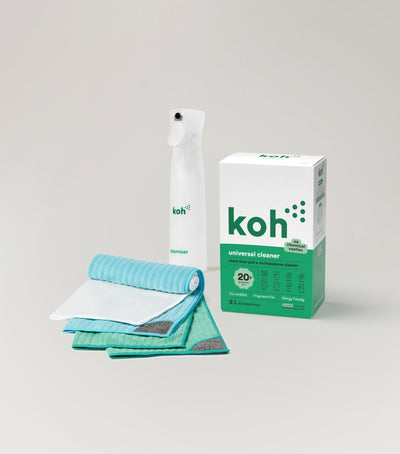
New at Koh? Start with the Universal Cleaner Starter Kit
Pairs Universal Cleaner with Atomiser Spray Bottle and everything you need to get going. Subscribe to the refills once you know you love it.

Koh Perks · earn points on every order
Stack savings on top. Subscribers still earn Koh Perks points on every recurring order, plus referral and birthday bonuses, redeemable for discounts on future orders.
Browse all Subscribe & Save articles →
Last reviewed: July 2026